
Introduction
In today’s digital era, the demand for interactive technology is rapidly increasing across education, corporate, and government sectors. One of the most essential tools leading this transformation is the smartboard. Designed to replace traditional whiteboards and projectors, a digital board offers a more advanced, efficient, and engaging way to present information.
Whether it is used in classrooms, meeting rooms, or training environments, the smartboard allows users to interact with content in real time. This makes communication clearer, more dynamic, and highly collaborative.
What Is a Smartboard?
A smartboard is an interactive digital display that combines the functionality of a whiteboard, projector, and computer into a single device. Users can write, draw, annotate, and control applications directly on the screen using touch or a stylus.
Unlike conventional boards, a digital board is connected to the internet and supports various digital tools. It allows users to open presentations, browse websites, conduct video conferences, and save notes instantly.
This all-in-one functionality makes the smartboard an ideal solution for organizations looking to simplify their setup while improving productivity.

How a Smartboard Works
A smartboard operates using advanced touch technology and built-in software. The screen detects touch input and translates it into commands, allowing users to interact with applications just like they would on a tablet or smartphone.
Most digital board come with integrated operating systems such as Android or Windows. This enables users to run apps, access files, and connect to cloud platforms without needing an external computer.
Additionally, wireless connectivity allows seamless screen sharing from laptops, tablets, or smartphones, making presentations faster and more convenient.
Key Features of a Smartboard
Interactive Touchscreen
Users can write, draw, and interact with content directly on the display, making it highly intuitive.
Wireless Screen Sharing
Present content instantly from any device without using cables.
Built-in Applications
Includes whiteboard tools, browsers, and media players for immediate use.
Multi-User Capability
Supports multiple touchpoints, allowing teams or students to collaborate simultaneously.
Cloud Integration
Save notes and files directly to cloud storage platforms for easy access.
High-Resolution Display
Provides clear visuals, making presentations more professional and engaging.
Benefits of Using a Smartboard
Improved Engagement
Interactive visuals and real-time annotations make lessons and meetings more engaging.
Enhanced Collaboration
Teams and students can share ideas and work together on a single screen.
Time Efficiency
No need for complex setup — everything is integrated into one device.
Cost Savings
Reduces reliance on projectors, printed materials, and additional equipment.
Flexible Communication
Supports hybrid learning and remote meetings through integration with video conferencing tools.
Smartboard in Education
In schools and universities, the smartboard plays a crucial role in improving teaching methods. Teachers can deliver interactive lessons using videos, diagrams, and real-time annotations.
Students are more engaged because they can participate directly by interacting with the board. Lessons can also be recorded and shared, allowing students to revisit content anytime.
This approach enhances understanding and supports different learning styles, making education more effective.
Smartboard in Business Environments
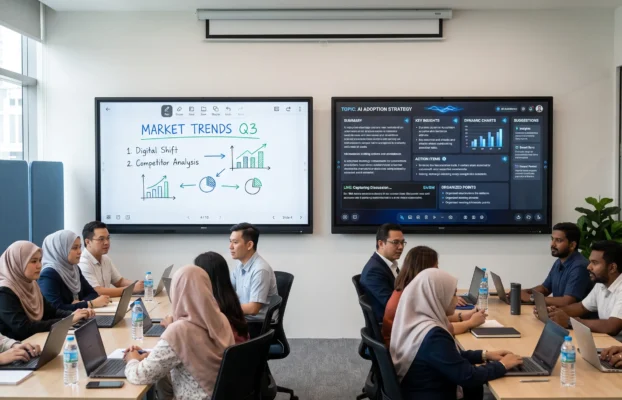
In corporate settings, a smartboard is widely used for presentations, meetings, and brainstorming sessions. It enables teams to visualize ideas, share content, and collaborate in real time.
With built-in video conferencing capabilities, digital board support hybrid meetings where remote participants can join seamlessly. This improves communication and ensures that all team members stay aligned.
Smartboard vs Traditional Tools
Traditional whiteboards and projectors are limited in functionality. They require multiple devices and manual setup, which can slow down productivity.
A smartboard, on the other hand, integrates all necessary tools into one system. Users can switch between writing, presenting, and video conferencing without interruptions.
This makes the digital board a more efficient and modern solution for both education and business environments.

Choosing the Right Smartboard
When selecting a digital board, consider the following factors:
- Screen Size – Suitable for your room and audience
- Touch Capability – Number of users interacting simultaneously
- Operating System – Android, Windows, or dual system
- Connectivity Options – Wireless casting and cloud integration
- Support & Warranty – Reliable after-sales service
Choosing the right smart whiteboard ensures long-term performance and usability.
Future of Smartboard Technology
The future of the digital board is closely linked to advancements in artificial intelligence and cloud computing. Upcoming features may include voice control, gesture recognition, and smarter automation tools.
As digital transformation continues, the digital board will become a standard tool in classrooms and workplaces. Organizations that adopt this technology early will benefit from improved efficiency and communication.
Conclusion
The smartboard is no longer just an upgrade — it is a necessity in today’s digital environment. By combining interactive technology, seamless connectivity, and powerful features, it transforms the way people teach, learn, and collaborate.
Whether you are in education or business, investing in a digital board is a step toward a smarter and more efficient future.
Looking to upgrade your space with a smartboard?
Explore our latest smartboard solutions and discover how you can enhance your classroom or meeting room today.